
Graphic LCD Resolutions: 128×64, 192×64, 240×128 and 320×240 Compared
Quick answer: The most common monochrome graphic LCD resolutions are 128×32, 128×64, 192×64, 240×64, 240×128 and 320×240 pixels. Resolution decides how much text and graphics fit, which controller family is practical, how much display memory is needed and what duty ratio the glass must be driven at. A 128×64 display holds 8 lines of 21 characters in a 6×8 font and needs 1 KB of display memory; a 320×240 display holds 30 lines of 53 characters and needs 9,600 bytes.
Choose the resolution from the content first, then check the physical size, because the same pixel count can be built at very different dot pitches.
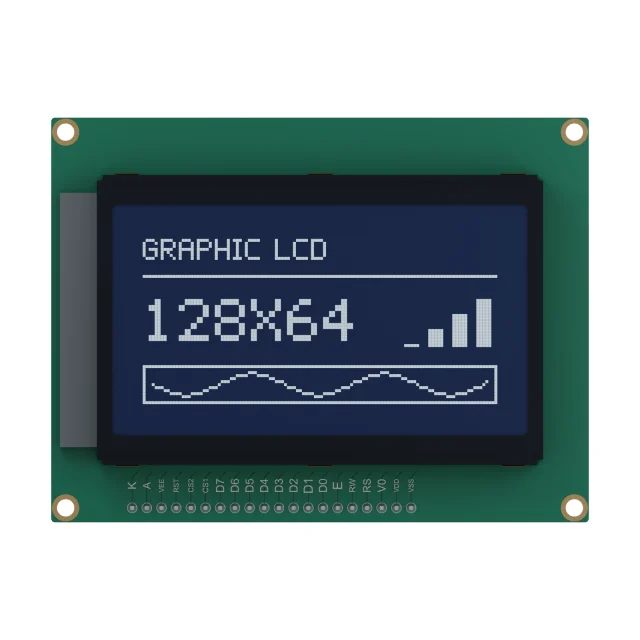
Graphic LCD Resolutions Compared
| Resolution | Pixels | Display memory (1 bit per pixel) | Text in a 6×8 font | Controller families often used |
|---|---|---|---|---|
| 128×32 | 4,096 | 512 bytes | 21 × 4 lines | ST7565 / ST7567-type single-chip controllers |
| 128×64 | 8,192 | 1,024 bytes | 21 × 8 lines | ST7565 / ST7567-type on glass (COG); on a board (COB), two KS0108-type drivers or an ST7920-type controller with a built-in font |
| 132×64 | 8,448 | 1,056 bytes | 22 × 8 lines | ST7565-type controllers use their full 132-column width |
| 192×64 | 12,288 | 1,536 bytes | 32 × 8 lines | Three KS0108-type column drivers |
| 240×64 | 15,360 | 1,920 bytes | 40 × 8 lines | T6963C-type controllers |
| 240×128 | 30,720 | 3,840 bytes | 40 × 16 lines | T6963C-type controllers |
| 320×240 | 76,800 | 9,600 bytes | 53 × 30 lines | RA8835 / SED1335-type controllers |
Text capacity assumes a 5×7 character in a 6×8 cell. Larger fonts, icons and graphics reduce it quickly: a 12×16 font on 128×64 gives about 10 characters on 4 lines. Controller names describe the type commonly paired with each format; the controller on a specific module comes from its specification.
How To Choose A Resolution
- Start from the content. List the longest line of text, the number of lines, the smallest symbol and any graphs or bar indicators. Then count pixels for the font you will actually use.
- Check the physical size. The same 128×64 format can be built with very different viewing areas. A smaller dot pitch gives sharper text but smaller characters; check the readable character height at the expected viewing distance.
- Consider the controller and host. Higher resolutions need more display memory, more data per screen update and often a parallel interface.
- Check contrast. More rows mean a higher duty ratio and a smaller voltage margin, as explained below.
If the content is only digits and fixed icons, a segment LCD is usually cheaper and clearer. If it is only rows of text, a character LCD module may be simpler. If you need color or images, compare small TFT LCD displays.
Rows, Duty Ratio And Contrast
A passive graphic LCD drives one row at a time, so the duty ratio follows the number of rows: about 1/32 or 1/33 for 32 rows, 1/64 or 1/65 for 64 rows, and 1/128 for 128 rows. The extra row in 1/33 and 1/65 is used by controllers that provide an icon row. The best bias is close to 1/(√N + 1), which gives 1/7 for 1/33 duty and 1/9 for 1/64 duty.
As the duty rises, the voltage difference between on and off pixels shrinks. That is why graphic displays use STN or FSTN modes rather than TN, and why large panels need a higher drive voltage. See LCD duty and bias for the arithmetic and monochrome LCD types for how STN and FSTN differ.
Controller Families And Interfaces
| Controller type | Native size | Host interface | Typical construction |
|---|---|---|---|
| ST7565 / ST7567-type | Up to 132 × 65 (64 rows plus an icon row) | SPI or 8-bit parallel | Chip-on-glass with an FPC; low power, 3.3 V |
| KS0108-type | 64 columns per chip; 2 chips for 128×64, 3 for 192×64 | 8-bit parallel with one chip-select per chip | Chip-on-board module with a pin header |
| ST7920-type | Common on 128×64; built-in character ROM including Chinese (GB) characters, plus graphic RAM | 8-bit or 4-bit parallel, or serial | Chip-on-board module with a pin header |
| T6963C-type | Common on 240×64 and 240×128; built-in character generator | 8-bit parallel | Chip-on-board module, often with external display RAM |
| RA8835 / SED1335-type | Common on 320×240 | 8-bit parallel | Chip-on-board module; built-in character generator and layered screens |
For a side-by-side comparison of the common 128×64 controller families, see how to compare 128×64 graphic LCD controllers. For a wider comparison of controllers and driver ICs, including HD44780-type character controllers, see LCD controller and driver ICs; for interface trade-offs, see I2C vs SPI vs UART vs parallel LCD interfaces.
Display Memory And Host Load
At one bit per pixel, display memory is width × height ÷ 8 bytes. The controller holds this memory, but many firmware designs keep a copy in the microcontroller to draw text and graphics and then send changed areas to the display.
- 128×64 needs 1,024 bytes, which fits easily in a small microcontroller.
- 240×128 needs 3,840 bytes; a full screen over SPI or a parallel bus is still quick.
- 320×240 needs 9,600 bytes, which can be significant on a small microcontroller; controllers with their own RAM and character generators reduce the host load.
Most monochrome controllers organise memory in pages of 8 vertical pixels per byte, so drawing text aligned to 8-pixel rows is the fastest.
Catalogue Examples
| Reference | Format and construction | Published drive and controller | Operating temperature |
|---|---|---|---|
| S12864D | 128 × 64 graphic LCD, chip-on-board, 20-pin header at 2.54 mm pitch | See the reference page | See the reference page |
| S2983D | Dot-matrix chip-on-glass with FPC, FSTN positive transflective, 3.3 V | 1/64 duty, 1/9 bias, ST7567 | −20 °C to +70 °C |
| S4417D | Dot-matrix chip-on-glass, STN (green) positive transflective, 3.3 V logic, 9.0 V LCD drive | 1/33 duty, 1/7 bias, ST7567A, 4-wire SPI | −30 °C to +65 °C |
Both chip-on-glass references follow the 1/(√N + 1) bias rule. For other formats and custom outlines, see graphic LCD display modules.
Graphic LCD Resolution FAQs
How many characters fit on a 128×64 LCD?
With a common 5×7 font in a 6×8 cell, a 128×64 display shows 8 lines of 21 characters. A 12×16 font gives about 4 lines of 10 characters.
What controller does a 128×64 graphic LCD use?
Three families are common. Chip-on-glass 128×64 displays often use an ST7565 or ST7567-type controller with an SPI or parallel interface. Chip-on-board modules often use two KS0108-type column drivers with an 8-bit parallel bus and two chip-select lines, or an ST7920-type controller with a built-in character ROM that includes Chinese characters. Check the specification of the specific module.
How much memory does a graphic LCD need?
At one bit per pixel, width × height ÷ 8 bytes: 1,024 bytes for 128×64, 1,920 bytes for 240×64, 3,840 bytes for 240×128 and 9,600 bytes for 320×240.
What duty ratio does a 128×64 LCD use?
Usually 1/64 or 1/65 duty, one row per time slot, with an extra row on controllers that support an icon row. The matching bias is about 1/9.
Is 240×128 or 320×240 better for an industrial HMI?
It depends on the content. 240×128 gives 16 lines of 40 characters and is enough for most menus and process values. 320×240 gives room for graphs and larger fonts, but needs more memory and a faster interface, and a small color TFT may then be worth comparing.
Choosing a graphic LCD format? Send the screen content, font sizes, outline limits, interface and operating temperature. Send your requirements for an engineering review, or browse graphic LCD display modules. For a custom format or outline, see custom LCD modules.