Drive settings
Confirm the drive scheme and LCD operating voltage for the quoted revision before selecting the segment driver. These values are not listed on this page.
Navigate
Rotate, zoom and inspect the product. Loads on request.
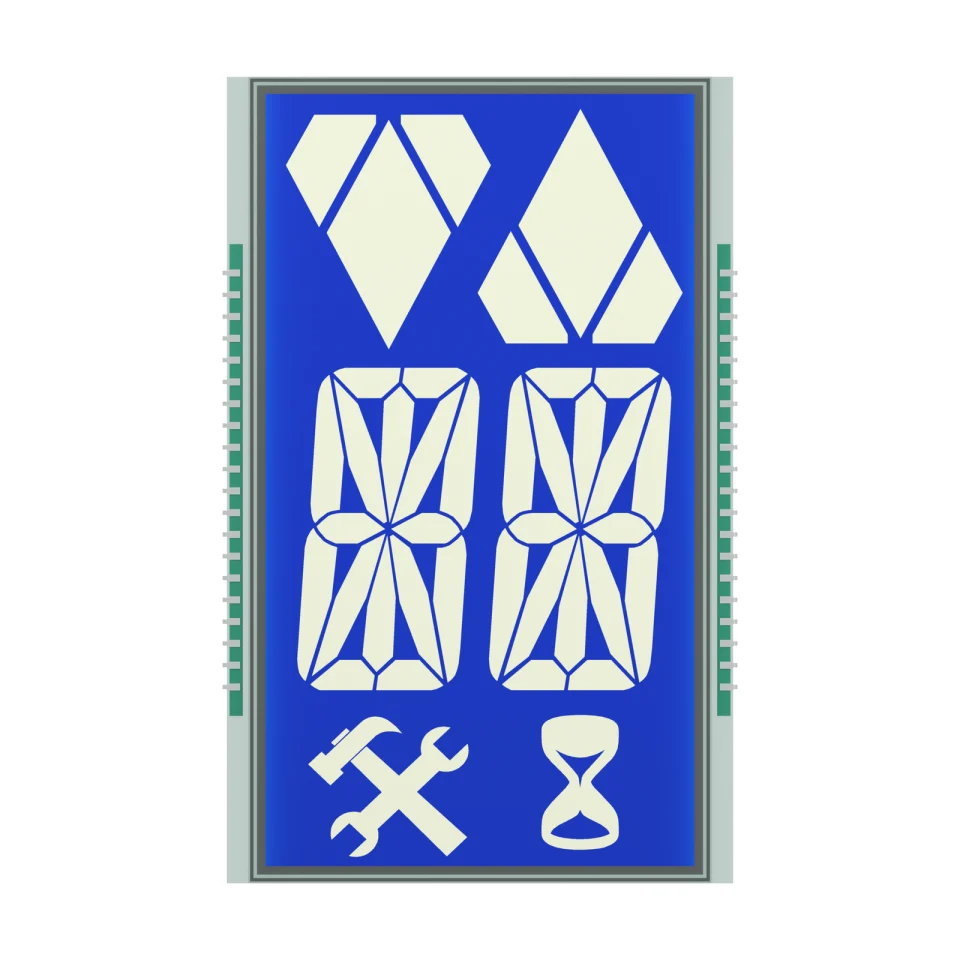
Front rendering of S3131D, showing the blue display with pale direction arrows, two 16-segment characters and the tool and hourglass icons. Materials and fine geometry are visual references for the OEM project.
OEM DISPLAY REFERENCE
S3131D uses a tall blue negative-mode layout with up and down direction arrows, two 16-segment characters and tool and hourglass icons. Twenty pins run along each long side of the glass.
Images, 3D geometry and listed parameters are OEM reference information. Final dimensions, electrical requirements, optical configuration and construction are confirmed for your project.
Short product video. Playback starts when you press play.
01 / REFERENCE CONFIGURATION
A reference configuration for discussing your LCD project. Final specifications are subject to project confirmation.
| Model reference | S3131D |
|---|---|
| Glass outline | 59.00 ± 0.20 × 94.00 ± 0.20 mm |
| Front glass width | 54.00 ± 0.20 mm |
| Viewing area | 50.00 × 90.00 mm |
| Maximum LCD thickness | 2.80 mm max |
| Pin pitch | 2.54 mm |
| Display mode | STN, negative (blue) |
| Connection | Pins |
| Polarizers | Front and rear transmissive, adhesive |
| Viewing direction | 6 o'clock |
| Operating temperature | −20 to +70 °C |
| Storage temperature | −30 to +80 °C |
02 / OEM DESIGN
Bring your requirements. We will review the configuration with you.
Confirm the drive scheme and LCD operating voltage for the quoted revision before selecting the segment driver. These values are not listed on this page.
The display is specified as negative mode with transmissive polarizers. Plan the backlight and the housing window around the 50.00 × 90.00 mm viewing area.
Confirm your host controller, supply, drive method and backlight requirements before sampling.
03 / APPLICATION DIRECTION
The source application is elevator displays. The arrows and characters are fixed display artwork; floor logic, the controller interface and any compliance requirements belong to the elevator system design.
ENGINEERING NOTES
How S3131D relates to LCD mode, drive, connection and integration choices, with links to the SuccessLCD engineering guides.
Super twisted nematic glass: keeps contrast at higher multiplex ratios, with a yellow-green, gray or blue appearance. Negative mode shows bright segments on a dark background with a backlight. Compare TN, HTN, STN, FSTN, DFSTN and VA →
Metal pins are soldered into the PCB, the most robust connection for segment glass. LCD connection types →
A negative LCD needs a backlight; the look is close to a VFD or LED readout. VFD vs LCD →
04 / PRODUCT SUPPORT
They are not listed on this reference page. The drive scheme and LCD operating voltage are confirmed for the quoted project revision.
The reference specifies front and rear transmissive polarizers in negative mode, a configuration normally viewed with a backlight. A backlight is not listed as part of this LCD reference.
YOUR NEXT LCD PROJECT
Share your required display content, enclosure space, drive arrangement, operating environment and target quantity.


