
Tall portrait opening
Plan the front panel around the 50.00 × 128.00 mm glass outline and the pins on the left and right edges.
Navigate
Rotate, zoom and inspect the product. Loads on request.
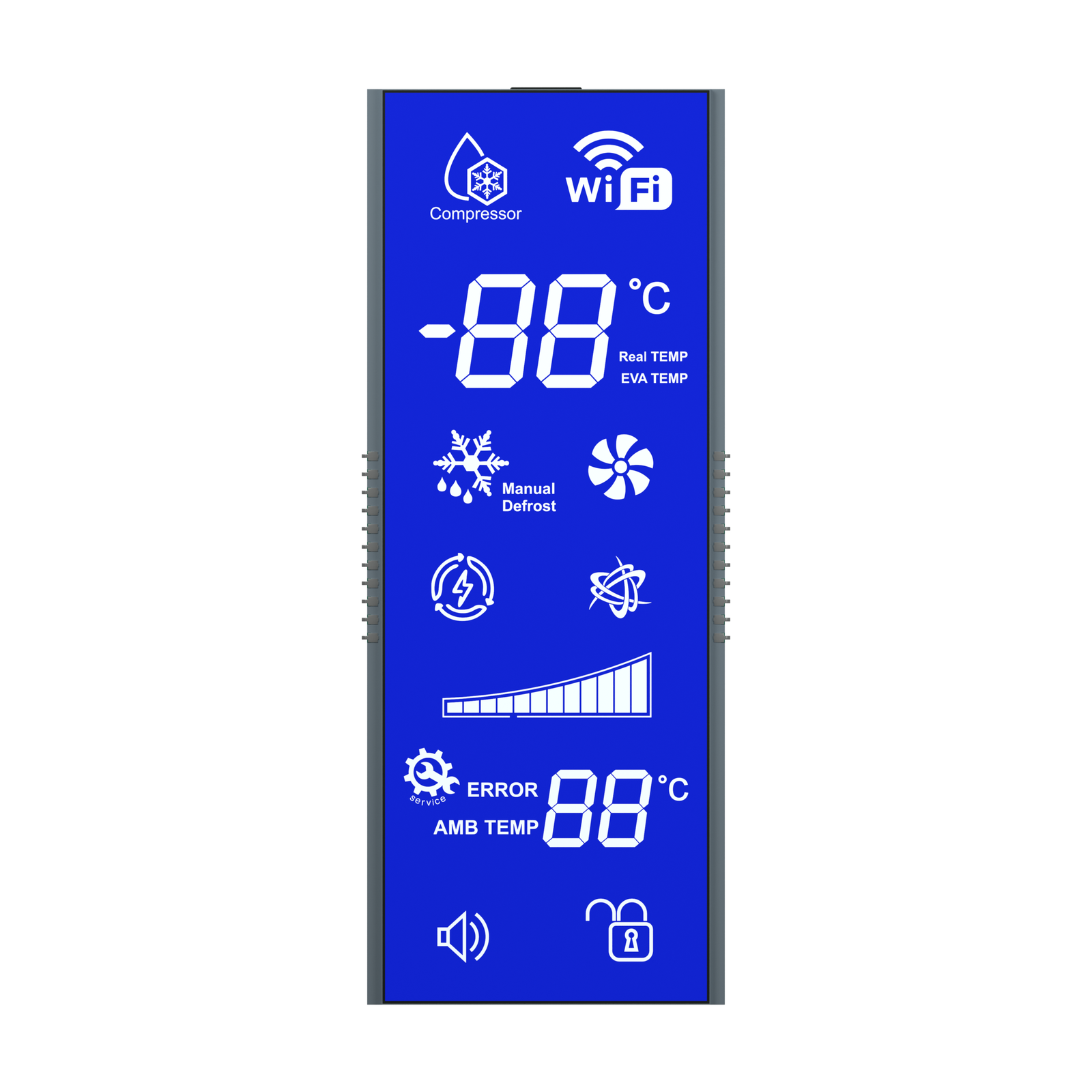
Front rendering of S3203D, showing the screen artwork and glass outline. Materials and fine geometry are visual references for the OEM project.
OEM DISPLAY REFERENCE
S3203D is a blue, negative-mode STN segmented LCD reference in a tall portrait format. The artwork stacks temperature readings, compressor, defrost and fan icons, a level bar and Wi-Fi, error, sound and lock indicators.
Images, 3D geometry and listed parameters are OEM reference information. Final dimensions, electrical requirements, optical configuration and construction are confirmed for your project.
Short product video. Playback starts when you press play.
01 / REFERENCE CONFIGURATION
A reference configuration for discussing your LCD project. Final specifications are subject to project confirmation.
| Model reference | S3203D |
|---|---|
| Display mode | STN (blue), negative |
| Rear glass width × height | 50.00 ± 0.20 × 128.00 ± 0.20 mm |
| LCD thickness | 2.80 mm maximum |
| Glass thickness per layer | 1.10 ± 0.10 mm |
| Connection | 22 pins: 11 along the left edge and 11 along the right edge |
| Pin pitch | 2.54 mm |
| LCD operating voltage | 3.0 V |
| Drive condition | 1/4 duty, 1/3 bias |
| Frame frequency | 64 Hz |
| Viewing direction | 6 o’clock |
| Rear polarizer | Transmissive, adhesive |
| Front polarizer | Transmissive, adhesive |
| Operating temperature | 0 °C to +50 °C |
| Storage temperature | −10 °C to +60 °C |
02 / OEM DESIGN
Bring your requirements. We will review the configuration with you.
Plan the front panel around the 50.00 × 128.00 mm glass outline and the pins on the left and right edges.
Both polarizers are listed as transmissive. Backlight construction, color and brightness are confirmed for the project.
Confirm which temperature readings and icons your controller drives before finalizing the segment mapping.
03 / APPLICATION DIRECTION
Use this reference to plan the temperature and status information on a refrigerator control panel. Confirm the indicator set, backlight design and the appliance’s operating environment for your project.
04 / PRODUCT SUPPORT
The reference lists 3.0 V LCD operating voltage, 1/4 duty, 1/3 bias and 64 Hz frame frequency. Check them against your LCD driver; final electrical requirements are confirmed for the project.
No. The icon is part of the display artwork only. Communication hardware belongs to the appliance design.
YOUR NEXT LCD PROJECT
Share your required display content, enclosure space, drive arrangement, operating environment and target quantity.


