
LCD Touch Screen Modules: How A Touch Panel Is Added To An LCD
Quick answer: an LCD touch screen is an LCD module with a transparent touch sensor mounted in front of it. The sensor is usually resistive, which responds to pressure, or projected capacitive (PCAP), which senses the finger’s electric field through a cover glass. A touch controller turns the sensor signals into coordinates and sends them to the host over its own interface, separate from the display interface. The sensor, cover lens and display are joined either with an air gap or by optical bonding.
SuccessLCD supplies TFT modules with resistive or capacitive touch fitted, standalone capacitive touch panels and cover lenses, and reviews the full front stack with the display and host so that touch, optics and mechanics are validated together.
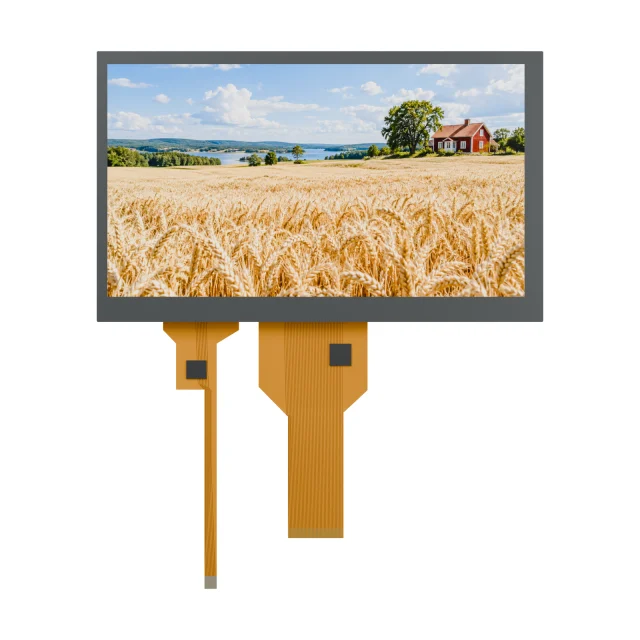
What Makes Up An LCD Touch Screen
| Layer or part | Role | What to specify |
|---|---|---|
| Cover lens | Protects the sensor and forms the visible front surface | Material, thickness, outline, printed border, surface treatment such as AG, AR or AF |
| Touch sensor | Detects touch position | Resistive or PCAP, active area, number of touch points needed |
| Bonding | Joins cover, sensor and display | Air gap with frame tape, or optical bonding with OCA or LOCA |
| Touch controller and FPC | Scans the sensor and reports coordinates | Controller interface (often I²C on small PCAP modules), connector, firmware and tuning |
| LCD module | Forms the image | Size, resolution, display interface, brightness and viewing direction |
Resistive Or Capacitive Touch On An LCD
- Resistive: two conductive layers touch when pressed. Works with a gloved finger or any stylus and is usually the simpler choice for single-touch controls, but adds a soft top film and passes slightly less light.
- Projected capacitive: senses through a glass cover, supports multi-touch gestures and gives a durable, flat front. Gloves, water and thick covers need controller tuning and validation.
The full comparison is in capacitive vs resistive touch screens.
Touch Stack Structures
Touch stacks are often named by their layers, with G for glass and F for film, for example G+G, G+F, F+F or F+G. The naming tells you which layers are glass and which are film, which affects strength, optical clarity, thickness and cost. The structure is chosen together with the cover lens, bonding method and use environment. See touch panels and cover lenses for SuccessLCD’s stack options.
Joining the layers is a separate decision. An air gap is simple and easy to rework; optical bonding removes internal reflections, which helps readability in bright light, and makes the front stack stiffer.
Display Interface And Touch Interface Are Separate
A touch LCD normally has two electrical connections to the host: the display interface, such as SPI, MCU, RGB, LVDS or MIPI, and the touch controller interface. On the S35001D 3.5-inch TFT, for example, the RGB display uses a 54-pin FPC and the capacitive touch has its own 10-pin FPC with an I²C touch interface. Plan both connectors, the touch interrupt and reset lines, and the touch driver in firmware. See the FPC vs FFC connection guide and the TFT LCD interface guide.
Integration Checks Before Tooling
- Host and driver: confirm the touch controller interface, address, interrupt and the driver for your operating system or firmware.
- Cover lens and tuning: cover material and thickness change PCAP sensitivity; tuning is done for the final stack.
- Use conditions: define glove, water, stylus and cleaning requirements early.
- Grounding and noise: PCAP sensors are sensitive to power and display noise; review grounding and cable routing.
- Optics: each added layer passes slightly less light and adds reflecting surfaces; check readability with the complete stack. See LCD brightness in nits.
- Finished device: test the touch assembly in the real enclosure, with the real bezel pressure and cable.
SuccessLCD Touch Catalogue Examples
| Reference | Display | Touch | Display interface |
|---|---|---|---|
| S240MCQS-18P | 2.4-inch, 240 × 320 | Resistive | 8-bit MCU |
| S350MLQZ | 3.5-inch, 320 × 240 | Resistive | SPI + RGB |
| S35001D | 3.5-inch, 320 × 240 | Capacitive, separate 10-pin touch FPC | RGB |
| S400MHZS-03F1 | 4-inch square, 480 × 480 | Capacitive | RGB + SPI |
| S400MB1ZS-01F2 | 4-inch square, 720 × 720 | Capacitive | MIPI |
| S500MI4WS2-03F1 | 5-inch, 800 × 480 touch display assembly | Capacitive | 24-bit RGB |
| S10MB1XH-07C0 | 10.1-inch, 1024 × 600 | Capacitive | LVDS |
| S700GG-42 and S10GF2-94 | Standalone 7-inch and 10-inch class touch panels | Capacitive, I²C | Pairing with a display confirmed per project |
Touch structure, cover lens and controller are confirmed for each project. Browse TFT LCD modules with the touch filter for more options.
LCD Touch Screen FAQs
What is an LCD touch screen?
An LCD touch screen is an LCD module with a transparent touch sensor in front of it. The LCD forms the image, the sensor detects touch, and a touch controller reports the touch coordinates to the host over a separate interface.
Can a touch panel be added to an existing LCD?
Often, yes. A resistive or capacitive touch panel can be matched to the LCD’s outline and active area and joined with an air gap or optical bonding. The cover lens, controller, connector and mechanical fit must be designed for the combination and validated in the product.
Is resistive or capacitive touch better for an LCD?
Capacitive suits a glass front, multi-touch and a modern feel. Resistive suits single-touch controls, gloves and styluses, and simpler interfaces. The right choice depends on the user, the environment and the cover design.
What interface does a touch panel use?
The touch controller has its own interface, separate from the display. Small capacitive touch panels commonly use I²C with an interrupt line; other controllers use SPI or USB. Resistive panels connect to a resistive touch controller or a microcontroller with touch inputs.
Does adding touch reduce LCD brightness?
Slightly. Every layer in front of the LCD passes a little less light and adds surfaces that reflect ambient light. Optical bonding and anti-reflection treatments reduce the reflections; the final brightness should be checked with the complete stack.
Planning a touch display? Send the display size, host interfaces, cover lens idea, glove or water requirements and enclosure details. See what to include in a TFT LCD module RFQ or send your touch display requirements for an engineering review. For a TFT with integrated touch, see custom TFT display engineering.