
Digital-7 and 7-Segment Fonts: From LCD Mock-Up to Real Segment Artwork
Quick answer: Digital-7 is a 7-segment style font by the type designer Style-7. It is widely used to imitate LCD and LED readouts in product renders, apps and interface mock-ups, and it is distributed as freeware for non-commercial use, with a commercial licence available from the designer. DSEG is an alternative family of 7- and 14-segment fonts released under the SIL Open Font License 1.1, which allows commercial use.
A font is only a picture of an LCD. On a real segment LCD, every digit, point and icon is drawn as electrode artwork on the glass and wired to driver pins, so the font serves as a style reference and the LCD drawing is what gets approved.
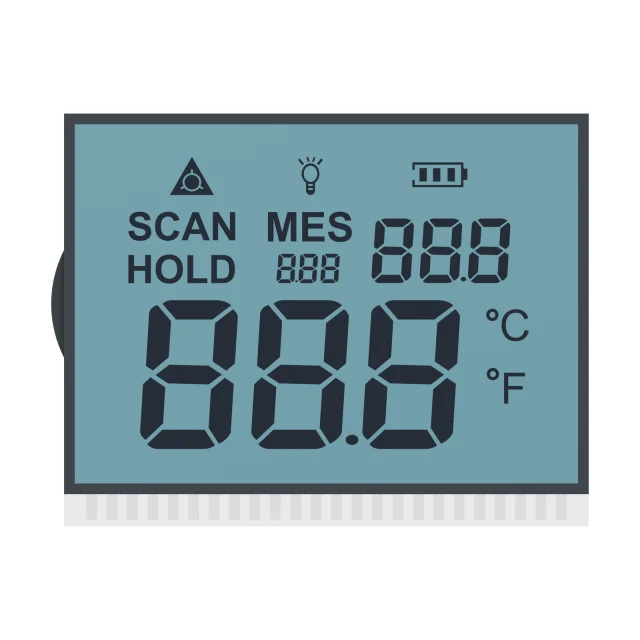
Digital-7 And DSEG Compared
| Font | Designer | Licence (as published) | Styles | Typical use |
|---|---|---|---|---|
| Digital-7 | Style-7 | Freeware for non-commercial use; contact the designer for a commercial licence | Regular, Italic, Mono and Mono Italic | Clock, meter and scoreboard looks in mock-ups and personal projects |
| DSEG7 and DSEG14 | Keshikan | SIL Open Font License 1.1: commercial use, modification and redistribution allowed; the font itself may not be sold | Classic and Modern, in light, regular and bold with italics, plus “Mini” versions with wider segment gaps | Apps, web pages and firmware that need an LCD look; DSEG14 for letters |
Licences can differ between download sites and versions. Read the licence file that comes with the copy you use, and treat a font embedded in commercial firmware or a sold app as commercial use.
Font Versus Real Segment LCD
| Aspect | 7-segment font | Segment LCD glass |
|---|---|---|
| Shapes | Fixed by the font designer | Drawn for the outline, digit height and viewing area of the product |
| Segments | Parts of a glyph image | Separate electrodes, each connected to a segment line and multiplexed with common lines |
| Characters | Any glyph the font includes | Only what the segments can form; K, M, V, W, X and Z are unclear on 7 segments |
| Unlit segments | Usually invisible | Can be faintly visible at some angles, more so in heat or at high drive voltage |
| Gaps and slant | Chosen for appearance | Set by pattern rules and alignment tolerance; slant drawn into the artwork for every digit and icon |
See 7-, 14- and 16-segment digit design for digit heights, segment counts and which letters each format can show.
From Font Mock-Up To LCD Drawing
- Fix the content: number of digits, digit height, decimal points, colons, minus sign, units and icons.
- List the characters: note every letter or message each position must show, such as “E”, “r”, “Lo” or “OFF”.
- Describe the style: upright or slanted, segment thickness and gap. A screenshot of the font mock-up is a useful reference.
- Count the segments: 4 digits × 7 segments, 3 decimal points and a colon make 32 segments. At 1/4 duty that needs 4 common and 8 segment pins; static drive needs 33 pins. See segment LCD duty and bias.
- Approve the drawing: the LCD drawing and the segment-to-pin map, not the font file, define the glass.
SuccessLCD designs this artwork for custom segment LCDs. A font mock-up plus the list above is a good starting point for a quotation.
Drawing 7-Segment Digits In Firmware
On a TFT or graphic LCD, large 7-segment digits can be drawn either from a bitmap font rendered at the needed size or as seven filled polygons, which scale cleanly and need no font licence. The segments are named a to g: a is the top bar, b and c run down the right side, d is the bottom bar, e and f run up the left side, and g is the middle bar.
| Digit | Segments on | Pattern (bit 0 = a … bit 6 = g) |
|---|---|---|
| 0 | a b c d e f | 0x3F |
| 1 | b c | 0x06 |
| 2 | a b d e g | 0x5B |
| 3 | a b c d g | 0x4F |
| 4 | b c f g | 0x66 |
| 5 | a c d f g | 0x6D |
| 6 | a c d e f g | 0x7D |
| 7 | a b c | 0x07 |
| 8 | a b c d e f g | 0x7F |
| 9 | a b c d f g | 0x6F |
On a segment LCD, the bits written to the driver IC follow the glass’s segment-to-pin map, which is rarely in a–g order. Build the lookup table from the LCD drawing; driver ICs such as HT1621-type parts are covered in LCD controller and driver ICs.
Digital-7 And 7-Segment Font FAQs
Is the Digital-7 font free for commercial use?
Digital-7 is published by Style-7 as freeware for non-commercial use, and a commercial licence can be bought from the designer. Always check the licence file of the copy you download. DSEG, under the SIL Open Font License 1.1, allows commercial use.
Which font looks like an LCD display?
Digital-7 and DSEG7 imitate 7-segment LCD digits. For letters, DSEG14 imitates 14-segment displays. For a dot-matrix look, use a 5×7 pixel font.
Can I use a 7-segment font on a real LCD?
Not directly. A segment LCD’s digits are electrode artwork on the glass. The font is a useful style reference, and the manufacturer draws the segments to fit the outline, digit height and driver.
What are the segment letters a to g?
a is the top bar, b the upper right, c the lower right, d the bottom bar, e the lower left, f the upper left and g the middle bar. A decimal point is often called dp.
Can a 7-segment display show letters?
Some: A, b, C, d, E, F, H, L, o, P, r and U are readable. K, M, V, W, X and Z are not; use a 14- or 16-segment digit or a dot-matrix display for full text.
Turning a mock-up into a segment LCD? Send the mock-up, digit height, characters to show, outline limits and driver. Send your requirements for an engineering review, or see custom segment LCDs. See also custom LCD module options.